Project

Ollama Chat-UI

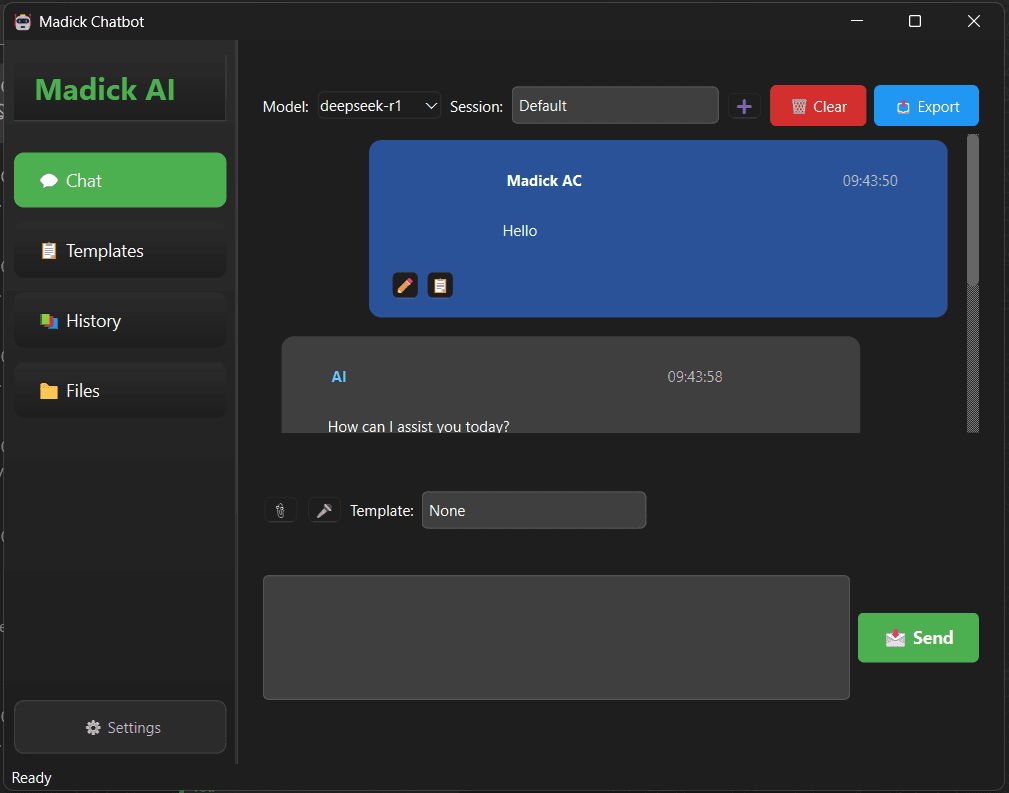
Desktop application leveraging PyQt6 and Ollama. Key features include real-time responses, voice input, prompt templates, file attachments, conversation export etc.

Local AI Chatbot

A feature-rich desktop chatbot application built with PyQt6 and Ollama LLMs, designed for seamless local AI interactions.

✨ Features

  • Multiple LLM Support: Seamlessly switch between various models:
    • Llama 3 (8B and 70B variants)
    • DeepSeek
    • Mistral (7B and Instruct)
    • Llama 2
    • Any other model supported by Ollama
  • Chat Management:
    • Create, save, and load multiple chat sessions
    • Organize conversations by topic or project
  • Conversation History: Full searchable history with metadata
  • Real-time Interactions:
    • Streaming responses for natural conversation flow
    • Voice input support for hands-free operation
  • Productivity Tools:
    • Template system for frequently used prompts
    • File attachments for context-aware conversations
    • Code syntax highlighting
  • User Experience:
    • Dark and light themes
    • System tray integration
    • Comprehensive keyboard shortcuts
  • Export Options: Save conversations in JSON, TXT, HTML, or MD formats

🚀 Installation

  1. Download the App Executable

  2. Make sure you have Ollama installed and running:

#AI#chatbot

Screenshots

Ollama Chat-UI screenshot 1

Screenshot 1